
Show progress, not just a token
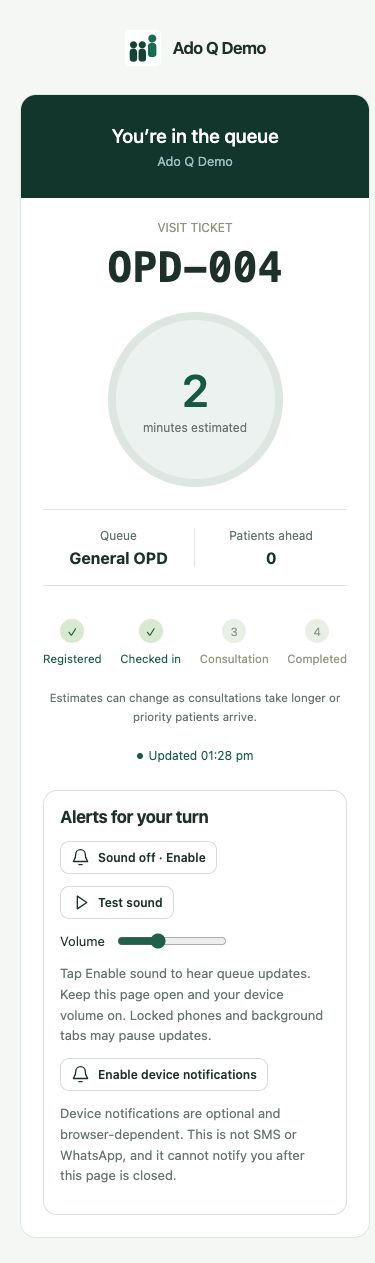
Visitors can see queue position, people ahead and an estimated wait. That estimate changes with operational conditions rather than promising a fixed service time.
“How much longer?” is a reasonable question. Give visitors a simple way to follow their place and next step without asking reception for every update.
General consultation
Check this page for the next update.
A number alone does not explain whether service is moving, paused or ready for the visitor. Ado Q’s personal status view connects the queue with the person waiting, so the next step can be clearer on both sides of the desk.
A real mobile view: visit ticket, estimated wait, people ahead and the next stage. No dedicated app download.
Visitors can see queue position, people ahead and an estimated wait. That estimate changes with operational conditions rather than promising a fixed service time.
Queue and visit status help people understand whether they are waiting or called. When assigned, counter information makes it easier to know where to go.
The link opens in a phone browser without a dedicated app. Keep assisted calling in place: browser sound needs permission and an active page, and not every visitor will use a phone.
Create the visit through the desk or configured check-in flow.
Give the visitor their personal queue-status link.
Let them check progress as staff update the visit.
Create the visit through the desk or configured check-in flow.
Give the visitor their personal queue-status link.
Let them check progress as staff update the visit.
Bring one everyday service scenario to your demo: who arrives, who handles the visit and what information needs to follow them. We’ll walk through the relevant controls and discuss your staff roles, devices and selected plan. Start with a small evaluation using sample records before planning a wider rollout.
Do not promise an exact return time. Estimates can change, and your organization should explain how far visitors may go and what happens after a missed call.
No. Browser permissions, device behavior and whether the page is active affect sound. WhatsApp updates require a separately configured business integration.
No. Queue and visit status are separate from detailed clinical records and uploaded documents, which are managed by authorized staff.
Connected clients. Coordinated service.
More human connection.